
Print, Scan and Copy: Does a College Student Need an All-in-One Printer?
Your assignment is ready, but the print shop has closed. Tomorrow, you also need a copy of your college ID and a scanned signature for an internship application. These small jobs can make owning a printer tempting.
But convenience alone does not settle the decision. Some students print every week; others submit almost everything online. An all-in-one printer for college students makes sense when printing, scanning and copying are regular needs. If they are rare, campus facilities and a phone scanner may be enough.
What Does an All-in-One Printer Actually Do?
An all-in-one printer combines three functions in one machine:
● It prints digital files, such as assignments, reading material and application forms.
● It scans paper documents into digital files for saving or uploading.
● It copies an existing paper document without requiring you to recreate it on a computer.
You can therefore print a report, save a signed form as a PDF and photocopy a receipt using the same device. However, each function has limits. Printing a long document quickly does not mean the machine can scan a stack automatically.
Start With Your Actual College Work
Look at your previous month rather than imagining every possible use. Count printed pages, visits to the photocopy shop and documents you needed to scan.
Also check hostel rules, available desk space and access to a plug socket before buying.
Is a Scanner Better Than Your Phone?
A phone scanning app can handle a readable receipt or a single signed page. Place the document in good light, keep the camera level and check the result before uploading.
A flatbed scanner becomes useful when you want consistent page alignment, fewer shadows and clear copies of handwritten notes. You place the document on the glass and close the lid. It can also help with delicate originals that should not pass through rollers.
Check the scanner's maximum document size. A printer that accepts longer paper does not necessarily scan that entire sheet on its glass.
For several pages, a flatbed requires you to replace each sheet manually. An automatic document feeder handles a stack. Automatic duplex printing is a separate feature: it prints on both sides but does not automatically scan both sides.
Choose Ink or Toner Around Your Subjects
Colour matters when it carries information
Architecture references, biology diagrams and presentation charts may lose meaning in greyscale. A colour inkjet is worth considering if these appear regularly in your coursework.
For occasional photographs, check supported photo paper and print sizes. Photo printing uses more ink than a typical text page, so avoid treating every page as equally cheap.
Running costs matter after the purchase
A cartridge printer can suit modest printing needs. A refillable ink tank deserves consideration when you print regularly, particularly in colour. A monochrome laser suits text-heavy work when colour output is unnecessary.
Compare replacement ink or toner prices with their stated page yields. Yield means the estimated number of pages a supply can produce under test conditions. Actual results vary with page coverage and usage.
For a simple estimate, divide the replacement supply price by its stated yield. Add paper costs separately. Compare black and colour costs separately too, and check what supplies come in the box.
Then compare ownership with your local shop. As an illustration, printing 100 pages monthly at ₹3 per page costs ₹3,600 over a year. These are example figures, not typical market rates. For ownership, include the printer's purchase price, supplies, paper and likely maintenance over the same period. A cheaper page does not automatically make buying worthwhile if you will not print enough to recover the full initial expense.
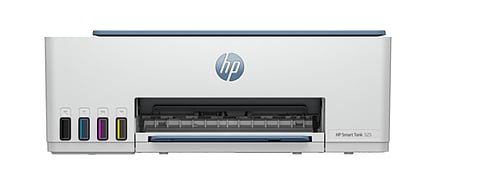
Which HP Models Fit Different Student Needs?
These options address different routines; the practical choice depends on your workload.
Check the Details That Affect Daily Use
Wireless printing lets you send assignments from a compatible laptop or phone without connecting a USB cable each time. In shared accommodation, check whether the Wi-Fi network allows devices to communicate; some managed networks restrict this.
Before paying, check these practical points:
● Confirm support for your laptop's operating system and your phone.
● Measure the space with paper trays extended and room to lift the scanner lid.
● Check whether automatic duplex works with the paper sizes you use.
● Find out how to buy compatible supplies and access local servicing.
Follow setup and maintenance instructions, especially before leaving an inkjet unused during holidays. Preview PDFs before printing to catch blank pages, cropped diagrams and incorrect page sizes.
So, Should You Buy One?
Buy an all-in-one if you regularly need paper output, usable scans and quick copies. Choose around your subjects, monthly workload and replacement supply costs.
re
If you print only before examinations and scan a few forms each term, keep using campus facilities. The right purchase solves recurring problems without consuming money and space for features you rarely use.
Disclaimer: This article is published in association with HP and not created by TNM Editorial.
Follow TNM's WhatsApp channel for news updates and story links.